Where your research starts talking back
Google NotebookLM is a free productivity app that feels less like a blank notebook and more like a desk covered in highlighted papers, sticky notes, and half-finished ideas that somehow begins answering you in complete sentences.
Top Recommended Alternative

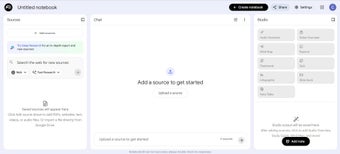
Instead of acting like a general chatbot, Google NotebookLM builds responses from the documents, notes, PDFs, links, and files you choose to give it. That makes the experience feel more grounded, more useful, and far less slippery than a lot of AI tools that are happy to sound confident even when they are drifting away from the material.
The notebook that keeps learning new tricks
Google NotebookLM is not trying to be your everything app. It is trying to be your thinking partner for one specific pile of information at a time. Whether that pile is lecture notes, research papers, project documents, or interview material, the tool is built to summarize, explain, organize, and reframe those sources in ways that save time without fully flattening the original material. However, overreliance poses a risk.
It often feels useful in exactly the places where other AI tools become vague. Ask it to summarize a dense document, compare themes across notes, explain a concept in simpler terms, or pull out the main tension in a research set, and the whole system makes sense because it is staying tied to the materials you gave it. That makes it especially strong for studying, writing prep, synthesis work, and more.
Improving overtime with you
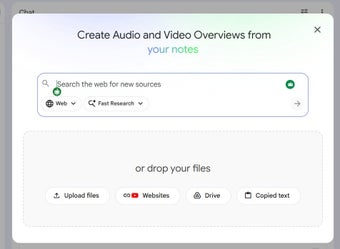
Google NotebookLM recent evolution has been more substantial than a normal round of minor updates. Google expanded the product with Deep Research and support for additional file types like Word docs and Sheets, then pushed it further with Video Overviews, later upgrading those into more cinematic versions tailored to the user. Google also introduced notebook syncing with Gemini, which means the same notebook context can now move across both products, making it more central to projects.
Still, this is also where the drawbacks begin to show. The more powerful NotebookLM becomes, the easier it is to treat it as a shortcut instead of a support tool. That is the app’s biggest risk. It is too tempting to let the AI do the structuring and explaining for you, which can blur the line between helping you think and quietly doing too much of the thinking in your place.
A smarter notebook that works best when you stay involved
Google NotebookLM stands out because it keeps AI tied closely to the actual material you are working with, which makes its summaries, explanations, and research support feel more dependable than a generic chatbot. Its growing feature set gives it real value for study and synthesis work. However, that same convenience can encourage overreliance, so it works best as a thinking aid rather than a substitute for your own judgment.